
Meta Ads Manager
Meta Platforms, Inc.Business
4.14.51K Reviews
- Version
- 501.0.0.52.105
- Installs
- 10.00M
- Age Rating
- Everyone
Screenshots
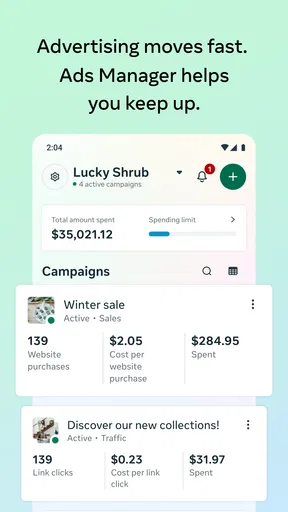
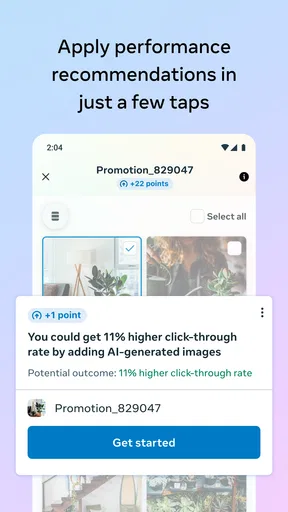
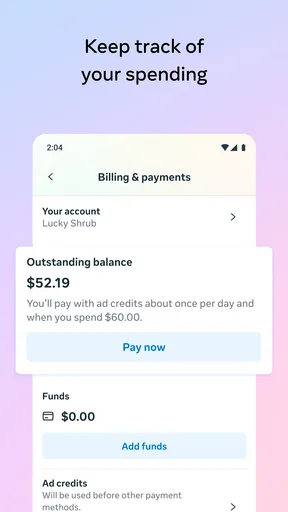
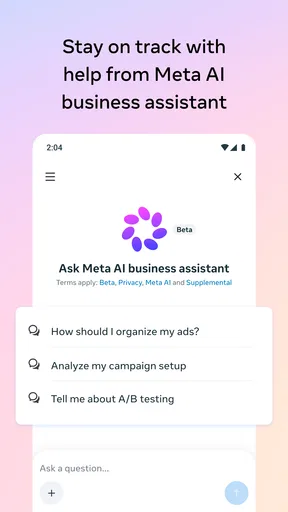
Our Review of Meta Ads Manager
 Analysis by Appyee
I use Meta Ads Manager as a mobile companion for checking and handling advertising work when I am away from a computer. It is a business app from Meta Platforms, Inc., aimed at people who need to create ads, review campaign activity, and make timely adjustments without opening the full desktop experience. My overall impression is that it is most valuable as a control room for active campaigns rather than as a complete replacement for desktop advertising work.
The app is free and available to an Everyone audience, which makes it easy to try without adding a purchase decision to the setup process. Its average rating is 4.3 from around 565 thousand ratings, and it has passed 10 million installs. Those figures suggest that it is a well-established tool, although popularity alone does not guarantee that every campaign workflow will feel equally comfortable on a phone.
How Meta Ads Manager feels during real campaign work
I find the mobile experience most useful when I give each visit a clear purpose: check a campaign, answer a specific question, or make a considered small adjustment. That keeps the phone from becoming a cramped substitute for a full workstation and makes it easier to notice when a task deserves more room. The next question is whether that focused convenience is worth choosing this app over other ways of managing ads.
Fast checks are where the app makes the strongest case
The best reason to keep this app installed is simple: it shortens the distance between noticing something and acting on it. If I am travelling, waiting between meetings, or away from my main workstation, I can use the mobile interface to check the state of advertising activity instead of postponing every decision until I return to a browser.
That matters most for small, practical actions. I might want to review whether an ad is still running, look over recent results, or make a quick adjustment to an active campaign. A phone is naturally suited to this kind of short session. I can open the app, inspect the account, make a focused decision, and leave without setting aside the time required for a full desktop review.
Speed here should be understood as workflow speed rather than a promise that every screen will load instantly. The experience depends on the phone, the connection, the amount of account activity, and the complexity of the task. Still, the mobile format removes a major source of delay: having to find a computer before I can even begin checking the account.
I also find that short sessions encourage better discipline. Instead of endlessly browsing campaign details, I can decide what needs attention now and leave deeper analysis for a larger screen. That separation is useful because mobile advertising tools can become frustrating when they are treated like miniature desktop software.
Where heavier use starts to feel less comfortable
Meta Ads Manager is less convincing when I try to use it for a long, complicated planning session. A phone screen gives me less room to compare campaigns, audiences, creative variations, and performance information at the same time. Even when the app provides the information I need, moving between views can take more concentration than it would on a desktop monitor.
For that reason, I would not build an entire advertising strategy from the phone unless the job is deliberately small. A business owner running a limited number of campaigns may find the mobile workflow perfectly practical. Someone managing many campaigns or making detailed comparisons will usually work more comfortably in the browser and use the app for monitoring and urgent changes.
One useful habit is to decide the purpose of each session before opening the app. If I only need to check activity or respond to a clear issue, mobile is efficient. If I need to compare several periods, rethink the structure of a campaign, or inspect a large amount of information, I would move to a desktop environment instead of forcing the whole task onto a smaller display.
The app is also better for deliberate actions than for rushed tapping. Advertising changes can have real consequences, so a fast interface should not encourage careless decisions. I prefer to pause after selecting an option and verify the campaign, ad, and intended change before confirming. That extra moment is more valuable than saving a few seconds.
Stability and recovery during everyday use
My view of reliability is tied less to dramatic performance claims and more to how comfortably the app fits into repeated checks. A business tool needs to support a routine: open it, identify what deserves attention, complete the action, and return later without losing the thread. Meta Ads Manager makes sense in that role because its purpose is closely connected to ongoing campaign management rather than occasional browsing.
At the same time, I would avoid treating a mobile app as the only place where important advertising decisions happen. If a screen takes longer to respond, a connection changes, or I am unsure whether an action has completed, I would verify the result before trying again. Repeating a change simply because the first response was not immediately clear can create unnecessary confusion.
That recovery mindset is especially important when working away from a stable desk setup. I keep notes about what I intended to change, check the account context before acting, and return to the relevant screen to confirm the result. These are small habits, but they make mobile campaign management safer and reduce the chance of relying on memory after an interrupted session.
The app’s long presence in the store also gives it the feel of a mature product rather than a temporary experiment. It was released on June 29, 2015, and the current version is 490.0.0.48.105. I see that history as reassuring in general terms, but I still judge each update by how well the current workflow behaves on my device. A long-running app can remain useful while individual releases or phone configurations affect the experience differently.
What device limits change about the experience
Phone hardware matters, but the practical limitation is usually the combination of screen size, available attention, and connection quality. A newer device may make transitions feel more comfortable, while an older phone can make a business app feel heavier when several account details need to be displayed. I would not choose a phone solely for this app, but I would avoid expecting a basic or crowded device to provide the same comfort as a modern desktop setup.
Resource demands are also connected to how I use it. Brief checks are a modest request compared with leaving the app open while repeatedly navigating through campaign information. If I am trying to preserve battery during a long day, I use the app for targeted actions rather than keeping it open as a permanent dashboard.
Storage and maintenance are worth considering as well. The application is free, but free does not mean frictionless: it still needs space for installation and updates, and it may feel less pleasant if the phone is already struggling with limited storage or background activity. Keeping the device reasonably maintained is likely to help more than expecting the app alone to solve a slow mobile workflow.
I would also be careful with very small screens. Reading advertising information, selecting the correct campaign, and checking a final setting can all become tiring when text and controls are compressed. A larger phone improves comfort, but it does not remove the basic trade-off between portability and visibility. For detailed work, a tablet or computer remains the better environment.
A realistic day with the app
Imagine that I run a small online shop and have active ads while spending the day away from my office. During a break, I open Meta Ads Manager to see whether the campaigns are still in the state I expect. I do not attempt a complete account audit. Instead, I focus on the immediate question: is there anything that needs a decision before I can get back to work?
If the answer is no, the session can end quickly. If I spot an issue, I can investigate enough to decide whether a simple mobile adjustment is appropriate or whether the matter should wait for a desktop review. That distinction is the most useful part of the app for me. It does not have to do everything to be valuable; it only has to help me avoid being disconnected from active advertising work.
Later, when I am back at a larger screen, I can perform the more deliberate review. I might compare several campaigns, reconsider the structure of an advertising plan, or examine creative decisions with more space. The mobile app then becomes a practical extension of that workflow rather than a substitute for every other tool.
For a freelancer, this can also simplify client communication. I can check the current state before replying to a question instead of guessing from an earlier desktop session. I would still avoid making a significant change solely to provide a quick answer, but having current account access can make conversations more accurate and reduce unnecessary back-and-forth.
Useful habits that improve mobile campaign management
My first tip is to separate monitoring from planning. Use the phone to answer immediate questions, while reserving complex restructuring for a larger display. This reduces visual fatigue and lowers the risk of making a broad change simply because the mobile interface makes detailed comparison inconvenient.
My second tip is to confirm context before every important action. Accounts, campaigns, and ads can look similar when I am moving quickly. I make a habit of checking the selected item and the intended outcome before confirming anything. This is not a special feature; it is a practical safeguard created by the limitations of a small screen.
My third tip is to use the app as an early-warning tool, not as an excuse to react constantly. Frequent checking can become distracting and may encourage decisions based on a narrow moment rather than a considered review. I prefer scheduled checks or clear triggers, such as a planned campaign change or a question that needs an answer.
A fourth useful approach is to prepare a recovery path. If a session is interrupted, I note what I was checking and what I intended to do. When I return, I verify the current state instead of assuming the earlier action went through. This is particularly helpful when the phone changes networks or when I am working in a busy environment.
Finally, I would keep creative judgment separate from emergency management. Mobile access is excellent for staying connected to advertising operations, but a phone is not always the best place to judge visual details or compare multiple creative options. If the decision depends on subtle design differences, I prefer a larger screen and a calmer review.
Who should use it, and who should choose another workflow?
I think Meta Ads Manager is a strong fit for small business owners, freelancers, and marketing professionals who already run advertising activity and need access while away from a computer. It is especially useful when a campaign cannot simply be ignored until the end of the day. The free price also makes it an easy companion to test alongside an existing desktop routine.
It is less suitable for someone who wants a complete advertising education from a single mobile app. The tool is designed around managing ads, not replacing strategic knowledge, creative planning, or broader business analysis. A new advertiser may still need time to understand what each campaign decision means before relying on mobile controls.
I would also steer away from a phone-first workflow if the account is large, the campaign structure is complicated, or several people need to coordinate detailed changes. In those situations, the usual web-based tools offer more room for comparison and more comfortable navigation. Meta Ads Manager remains useful as a companion, but it should not be forced into the role of the entire advertising workstation.
Compared with checking ads through a mobile browser, a dedicated app feels more natural for repeated access. The main advantage is not that it turns a phone into a desktop; it is that it gives campaign management a focused place on the device. Compared with a full desktop advertising interface, however, the app sacrifices space and some comfort in exchange for portability. That trade-off is worthwhile when speed of access matters more than deep analysis.
My performance verdict
After using it as a mobile business companion, I see Meta Ads Manager as a practical tool for staying close to active advertising work. Its perceived speed is strongest during short, focused checks, while heavier sessions expose the normal limits of a phone screen and mobile workflow. I would describe it as useful and established, but not something I would rely on blindly for every complex decision.
The most sensible setup is a two-part routine: use the app for timely awareness, straightforward actions, and confirmation while away from the desk; use a browser or larger screen for planning, comparison, and careful review. That approach makes the app feel faster because each task is matched to the environment where it works best.
Meta Platforms, Inc. has built a recognizable mobile destination for advertising management, and its broad adoption reflects the fact that many users want this kind of access. The app’s Everyone rating also makes it approachable from an audience standpoint, while its business purpose keeps the experience focused rather than recreational.
My recommendation is clear: install it if you already manage Meta advertising and need dependable access from your phone, but treat it as a responsive companion rather than a full desktop replacement. For quick decisions, campaign checks, and staying informed during a busy day, it earns a place on my device. For deep analysis or large-scale account work, I would still move to the larger, more comfortable alternative.
Privacy and Permissions
See what permissions an app requests and how it handles your data.
- Device & app history
- retrieve running apps
- Identity
- find accounts on the device
- Contacts
- find accounts on the device
- Location
- approximate location (network-based), precise location (GPS and network-based)
- Photos/Media/Files
- read the contents of your USB storage, modify or delete the contents of your USB storage
- Storage
- read the contents of your USB storage, modify or delete the contents of your USB storage
- Wi-Fi connection information
- view Wi-Fi connections
- Other
- view network connections, create accounts and set passwords, full network access, read sync settings, run at startup, control vibration, prevent device from sleeping, toggle sync on and off
Verdict
Strengths of Meta Ads Manager
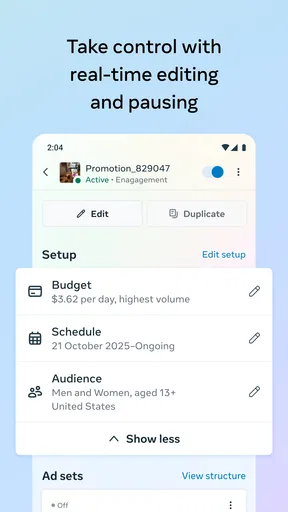
- Create, edit, and monitor campaigns from your phone.
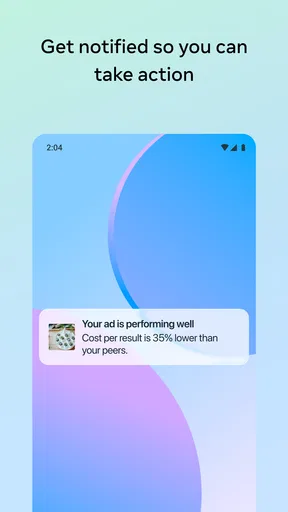
- Real-time alerts help you respond quickly to performance changes.
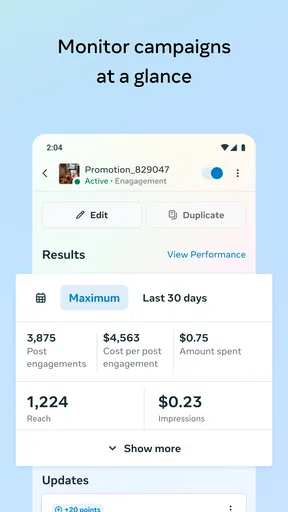
- Detailed metrics cover reach, clicks, conversions, and spending.
- Manage multiple ad accounts and pages in one application.
- Useful breakdowns reveal results by age, location, placement, or device.
Limitations of Meta Ads Manager
- Some advanced campaign settings are easier to use on desktop.
- Reports can take time to load, especially with large accounts.
- Frequent notifications may feel excessive without careful customization.
- Performance data may differ slightly from other Meta reporting tools.
- Requires a Meta business account and suitable permissions to function.
Other Releases by Meta Platforms, Inc.
View All


Similar Picks in This Category
View All
LinkedIn: Community & Network
LinkedIn3.8

Zoom Workplace
zoom.com4.1

Microsoft Teams
Microsoft Corporation4.6

Meta Business Suite
Meta Platforms, Inc.4.6

Webex Meetings
Cisco Systems, Inc.4.5

TeamViewer Remote Control
TeamViewer4.4
Frequently Asked Questions
What is Meta Ads Manager used for?
Meta Ads Manager is Meta’s central tool for creating, managing, and monitoring advertising campaigns on Facebook, Instagram, Messenger, and parts of the Meta Audience Network. From the app, you can choose campaign objectives, define audiences, set budgets and schedules, create ads, review performance metrics, and make adjustments while away from a desktop computer.
Can I create and manage Facebook and Instagram ads from the mobile app?
Yes. Meta Ads Manager allows you to create, edit, pause, duplicate, and monitor campaigns for Facebook and Instagram directly from an Android or iOS device. You can also review notifications, campaign delivery, spending, reach, impressions, clicks, and other results. However, some advanced settings and detailed workflows may be easier to access through the desktop version.
Is Meta Ads Manager free to download and use?
The Meta Ads Manager application is generally free to download, and Meta does not normally charge a separate fee simply for using the management tool. However, running advertising campaigns requires a budget, and you are billed according to the delivery and billing settings associated with your advertising account. Actual costs depend on factors such as audience, competition, objective, placement, and campaign duration.
Do I need a Facebook account or business page to use Meta Ads Manager?
You need a Meta account with appropriate access to an advertising account, business portfolio, Facebook Page, Instagram account, or other assets you want to promote. Depending on your campaign, you may also need to connect payment information and verify certain business details. Users without the required permissions may be able to view limited information but cannot create or modify every campaign.
What should I know before spending money on a campaign through the app?
Before launching a campaign, check the selected objective, audience, placements, daily or lifetime budget, schedule, payment method, and ad creative carefully. Meta’s review process can reject ads that violate its policies, and performance is not guaranteed. It is wise to begin with a controlled budget, monitor results regularly, and avoid making frequent changes before enough data has accumulated.
